Audit logs
You can search for selected administrative activities performed by users in your system, such as a system administrator login, transferring file ownership etc. This section describes how to search for such activities. To search for normal activities performed on a protected file by a user, see the Activities page.
- Add Repository
- Update Repository
- Delete Repository
- Map Repository
- Add Policy
- Update Policy Status
- Update Policy
- Map/Unmap Policy Entity
- Transfer Policy Ownership
- Assign Administrator
- Reset the entities locked to first machine
- Update File Status
- Transfer File Ownership
- Update User License
- Change Password for System Administrator
- Administrator Login
- Security Administrator Login
- Global Security Administrator Login
Log in to your Policy Server portal and click on More > Audit Log.
The Define filter for Audit log screen will be displayed.
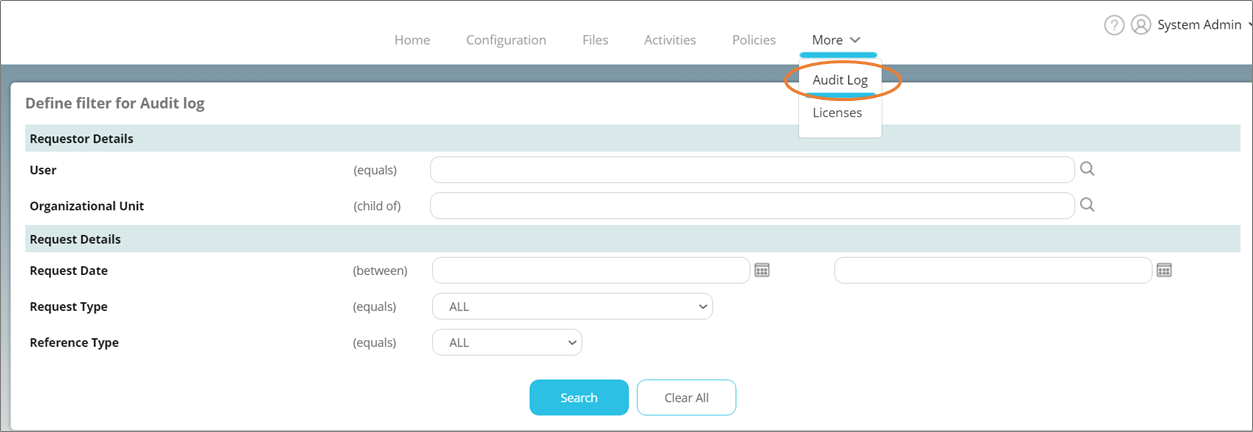
The following search parameters are available for searching audit logs.
- User: The user who performed the activity.
- Organizational Unit: The OU (Organizational Unit) of the user who performed the activity.
- Request Date: The date range in which the activity was performed. Click the calendar icon to display drop-down calendars to select dates. If you specify only one date, the other date will be automatically adjusted as the date when the first/last activity respectively was performed. For example, when you specify 20th July, 2012 as the From date and leave the To date empty, all search results between 20th July, 2012 and the current date and time will be displayed. The To date will be taken as the current date and time by default.
- Request Type: The type of the request you wish to search for. Choose the desired request type from the list.
- Reference Type: The value of the object created as a result of the request. Choose the desired option from the list.
Click Search to display the search results. Click Clear All to clear all entered values. The search results are displayed as follows.